Guide · Support
Contact support
Before writing, service status and troubleshooters; then how to write, and what to include for a quick answer.
Checked against the real screen on November 5, 2026
Before writing
Check the “Service status” page and the known issues: if a service is disrupted, the team already knows and says what to do meanwhile.
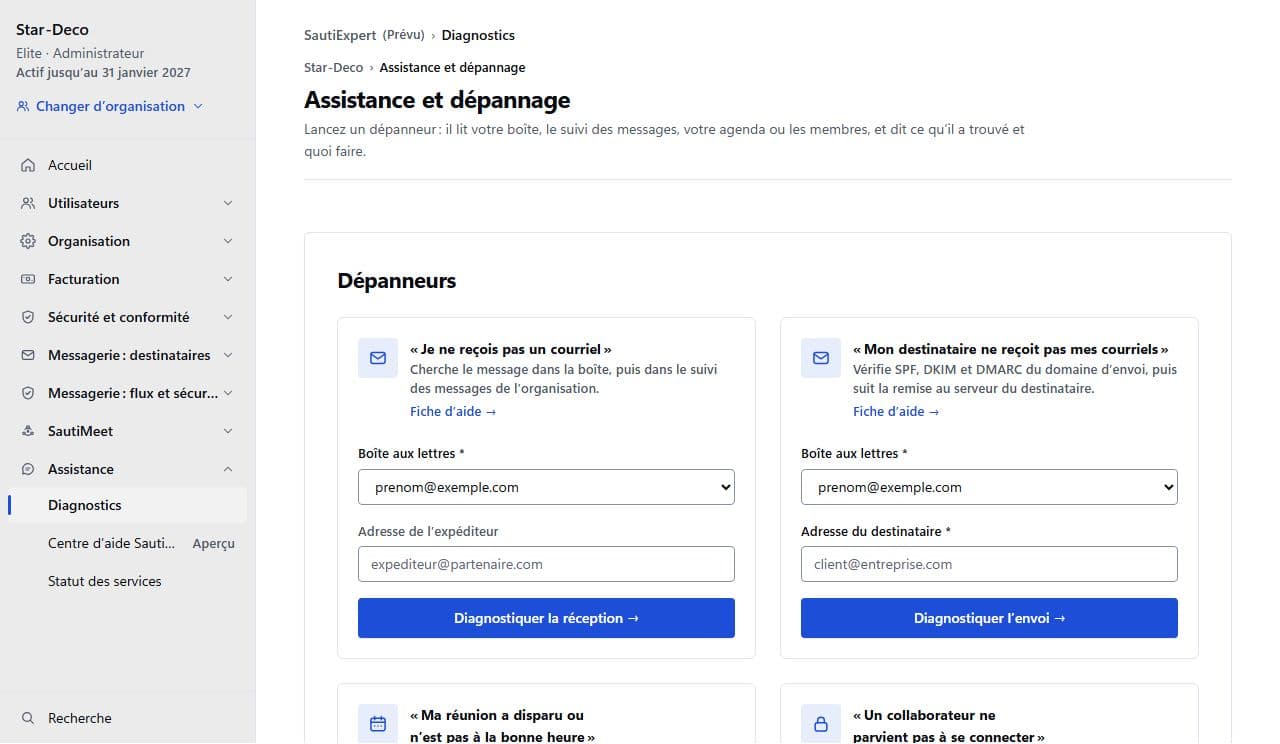
In the console, “Diagnostics” offers four troubleshooters (receiving, sending, meeting, sign-in). They say what they checked and the next step.
Write to the team
On the website’s Contact page, choose the subject “Technical Support”, describe the problem, then “Send message”. A reference number is shown: keep it. The answer arrives by email, at the address you gave.
You can also write directly to [email protected], and to [email protected] for a security issue.
- What you were doing, with the time and your time zone.
- What the screen shows, word for word, or a screenshot.
- The error reference, if the screen shows one.
- What you already checked, for example the troubleshooter you ran and its conclusion.
After an error
When an error page shows a reference, the link “Write to support with this reference” opens the Contact page with the reference already in the subject.